
Your serial number can be obtained by running the "enquiry" command, and noting the XXXX-XXXX-XXXX value(s) specified in the "serial number" field. It may help our engineers if you send the entire enquiry output in your reply. If you are unable to run "enquiry", you can also read the paper serial number directly from the device. Our PCI HSMs have a sticker displaying the serial number affixed to their side, and our netHSM products have the number printed on their back plate
Reporting a Problem
The nShield has two serial numbers, the Electronic Serial number and the Paper Serial Number.
Electronic serial number (ESN)
- Example: A343-FFAB-9745
- This value is returned by many nCipher utilities, e.g. “enquiry”.
- This value is not written on the hardware itself.
The paper serial number
- Example: 07-N24543 This serial number is printed on the actual hardware.
- nShield Solos have this serial number printed on a sticker on the card
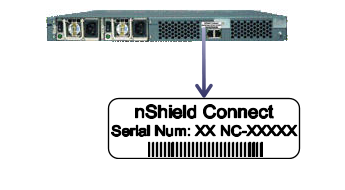
- nShield Connect modules have this serial number printed onto the back panel
- nShield Edge units have this serial number printed onto sticker on the back panel
- This number is never returned by any nCipher utilities.
- The photographs below should help you in locating the serial number:
Comments
0 comments
Please sign in to leave a comment.